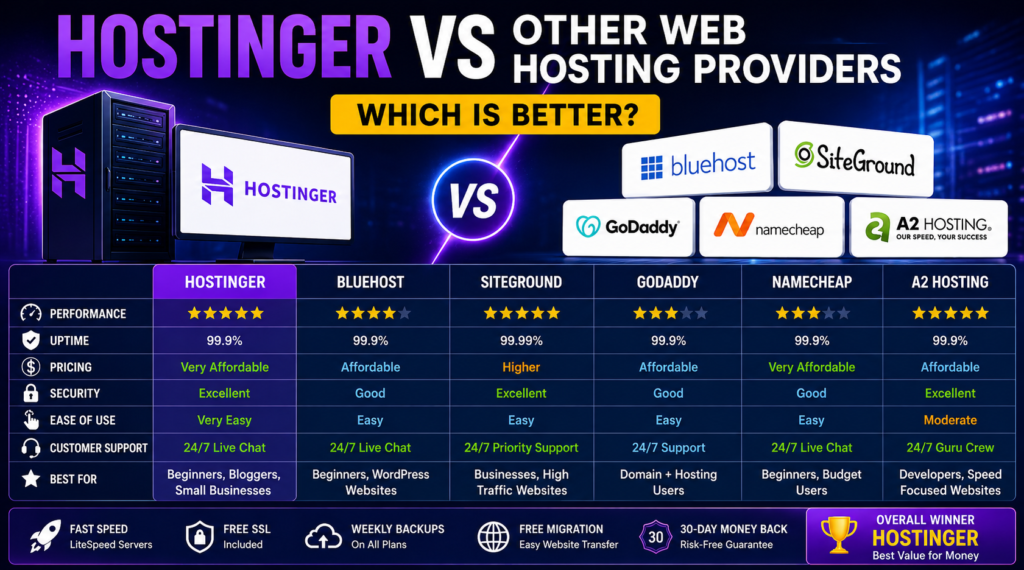
Hostinger vs Other Web Hosting Providers: Which Is Better? (Complete Comparison Guide 2026)
Choosing the right web hosting provider is one of the most important decisions when building a website. Whether you’re creating a personal blog, business website, online portfolio, WooCommerce store, or company website, your hosting provider directly affects your website’s speed, security, uptime, user experience, and search engine rankings.
Today, there are dozens of hosting companies offering similar services, making it difficult to know which one provides the best value. Some focus on premium performance, while others prioritize affordability or beginner-friendly tools.
Among the most popular hosting providers is Hostinger, known for its competitive pricing, modern control panel, fast loading speeds, and excellent value for money. However, companies like Bluehost, SiteGround, GoDaddy, Namecheap, and A2 Hosting also offer strong hosting solutions.
So, which hosting provider is better in 2026?
This guide compares Hostinger with other leading web hosting providers, helping you understand their features, performance, pricing, customer support, and overall value so you can choose the best option for your website.
Disclaimer: Pricing, features, and hosting plans may change over time. Always review the latest information on each provider’s official website before making a purchase.
Why Choosing the Right Hosting Matters
Many beginners think hosting is simply a place where website files are stored.
In reality, your hosting provider influences:
- Website loading speed
- Uptime reliability
- Search engine rankings
- Website security
- Customer experience
- Online sales
- SEO performance
- Website scalability
A slow or unreliable hosting provider can negatively impact visitors and reduce business opportunities.
What Is Hostinger?
Hostinger is an international web hosting company that provides affordable hosting solutions for individuals, small businesses, bloggers, developers, and online stores.
It offers several hosting services including:
- Shared Hosting
- WordPress Hosting
- Cloud Hosting
- VPS Hosting
- Business Hosting
- Email Hosting
Hostinger has become popular because it combines affordable pricing with modern technology and beginner-friendly management tools.
Hostinger Features
Hostinger includes numerous features that appeal to both beginners and experienced website owners.
Some of its most popular features include:
- Free SSL Certificate
- Free Website Migration
- WordPress Optimization
- LiteSpeed Web Server
- SSD Storage
- Weekly or Daily Backups (depending on the plan)
- Free Email (selected plans)
- Malware Scanning
- DDoS Protection
- Automatic Updates
- One-Click WordPress Installation
- Website Builder
- AI Website Tools
These features help simplify website management while improving performance and security.
Website Speed and Performance
Website speed plays a significant role in user experience and SEO.
Hostinger uses LiteSpeed Web Servers, SSD storage, and caching technologies designed to improve page loading times.
Fast websites can contribute to:
- Better user experience
- Lower bounce rates
- Improved SEO
- Higher conversion rates
- Better mobile performance
While performance also depends on website optimization, hosting quality provides the foundation for faster loading.
Ease of Use
One reason many beginners choose Hostinger is its simple interface.
Instead of using the traditional cPanel, Hostinger provides its own custom control panel called hPanel, designed to make common tasks easier.
Users can quickly:
- Install WordPress
- Create email accounts
- Manage domains
- Configure SSL
- Access backups
- Monitor website usage
The clean interface makes website management easier even for users with limited technical knowledge.
Security Features
Website security should never be overlooked.
Hostinger includes several security features such as:
- SSL certificates
- DDoS protection
- Firewall protection
- Secure data centers
- Malware scanning
- Account isolation
- Automatic updates
These features help reduce common security risks and improve website protection.
Customer Support
Reliable customer support becomes especially important when technical issues occur.
Hostinger provides support through:
- Live Chat
- Knowledge Base
- Tutorials
- Help Center
- Email Support
Many common website issues can also be resolved using Hostinger’s extensive documentation.
Hostinger vs Bluehost
Bluehost has long been a popular hosting provider, especially for WordPress websites.
Hostinger Advantages
- Lower pricing
- Modern interface
- Fast LiteSpeed servers
- Excellent value
- Beginner-friendly dashboard
Bluehost Advantages
- Long-established company
- Easy WordPress integration
- Good beginner experience
- Large customer base
For users seeking affordable hosting with modern features, Hostinger often provides better overall value.
Hostinger vs SiteGround
SiteGround is widely known for premium performance and excellent customer support.
Hostinger
- More affordable
- Better for budget-conscious users
- Easier pricing structure
SiteGround
- Premium support
- Strong performance
- Advanced developer features
- Higher pricing
Businesses with larger budgets may appreciate SiteGround, while many small businesses find Hostinger more cost-effective.
Hostinger vs GoDaddy
GoDaddy is one of the world’s most recognized domain registrars and hosting providers.
Hostinger
- Faster interface
- Better value
- Competitive hosting plans
GoDaddy
- Large domain marketplace
- Wide range of online services
- Popular brand recognition
Many website owners choose Hostinger for hosting while registering domains wherever they prefer.
Hostinger vs Namecheap
Namecheap is well known for affordable domains and hosting services.
Hostinger
- Better hosting-focused features
- Faster website management
- Excellent performance
Namecheap
- Affordable domains
- Budget-friendly hosting
- Good beginner options
Both companies are suitable for beginners, but Hostinger often offers stronger hosting performance.
Hostinger vs A2 Hosting
A2 Hosting focuses heavily on website speed.
Hostinger
- Better pricing
- Simpler dashboard
- Beginner-friendly
A2 Hosting
- Performance-focused
- Developer-friendly
- Premium plans
Developers may appreciate A2 Hosting, while beginners often prefer Hostinger’s simplicity.
Which Hosting Is Best for WordPress?
WordPress users typically look for:
- Fast loading
- Easy installation
- Automatic updates
- Secure hosting
- Daily backups
- Excellent support
Hostinger performs well in all these areas, making it a strong choice for WordPress websites, blogs, business sites, and WooCommerce stores.
Pricing Comparison
When comparing hosting providers, pricing should always be evaluated alongside the included features.
A lower monthly price may not include backups, email hosting, SSL certificates, or security tools, while a slightly higher-priced plan may provide better overall value.
Instead of focusing only on the initial promotional price, compare:
- Renewal pricing
- Included storage
- Bandwidth
- Free SSL
- Backups
- Email accounts
- Customer support
- Security features
This helps you choose a hosting plan that fits both your budget and long-term needs.
Pros of Hostinger
Hostinger offers several advantages, including:
- Affordable hosting plans
- Fast website performance
- LiteSpeed technology
- Beginner-friendly dashboard
- Free SSL certificates
- One-click WordPress installation
- Good security features
- Website migration support
- Modern infrastructure
- Excellent value for money
Things to Consider
Before choosing any hosting provider, consider factors such as:
- Your website type
- Expected traffic
- Budget
- Future growth
- Storage requirements
- Technical experience
No hosting provider is perfect for every situation. The best choice depends on your individual needs and goals.
Who Should Choose Hostinger?
Hostinger is a good option for:
- Beginners
- Bloggers
- Freelancers
- Small businesses
- Portfolio websites
- WordPress users
- WooCommerce stores
- Startup companies
- Agency websites
It offers a balance of affordability, performance, and ease of use.
Frequently Asked Questions
Is Hostinger good for beginners?
Yes. Its user-friendly dashboard and one-click installation tools make it suitable for beginners.
Can I host WordPress on Hostinger?
Yes. Hostinger offers hosting plans optimized for WordPress websites.
Does Hostinger provide SSL certificates?
Many hosting plans include free SSL certificates to help secure your website.
Is Hostinger suitable for WooCommerce?
Yes. Many users choose Hostinger for WooCommerce stores due to its performance and WordPress compatibility.
Final Verdict
Choosing the right web hosting provider depends on your website goals, technical requirements, and budget. While several hosting companies offer reliable services, Hostinger stands out for its combination of affordability, performance, modern features, and ease of use.
For beginners, bloggers, freelancers, small businesses, and WordPress users, Hostinger provides an excellent balance of speed, security, and value. Larger businesses with highly specialized requirements may wish to compare premium hosting providers, but for many website owners, Hostinger remains one of the strongest all-around choices in 2026.
Before making your decision, compare hosting plans carefully, review the included features, and choose a provider that matches your long-term website goals. A reliable hosting provider can help create a fast, secure, and scalable website that supports your online success for years to come.
Continue Learning About Website Development
Choosing the right web hosting provider is only one step in building a successful website. To create a fast, secure, and high-performing online presence, it’s also important to understand website development and choose the right platform for your business needs.
To help you make informed decisions, we recommend reading these related guides:
- Dropshipping Online Store Website: Complete Guide + Expert Developer (2026) – Learn how to build a professional dropshipping website using WordPress or Shopify, including essential features, payment gateways, SEO, and best practices.
- Raffle Competition Website Development: Complete Guide + Expert Developer (2026) – Discover everything you need to know about developing a secure and feature-rich raffle competition website, including ticket management, payment integration, instant win functionality, and user-friendly design.
These guides will help you choose the right technologies, improve website performance, and build a professional website that supports your long-term business goals.